
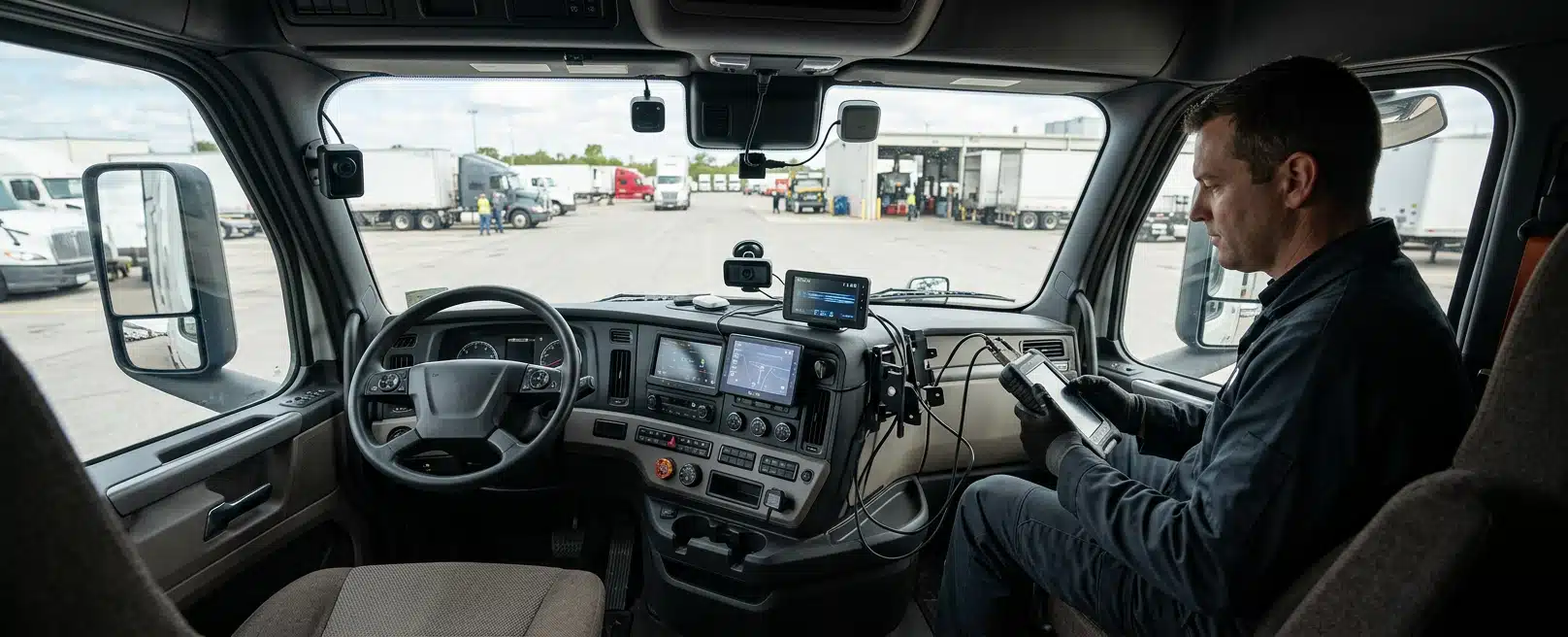
Driver Monitoring and Fleet Management System Installations for Long-Haul Transport Operators
A long-haul monitoring project is workable when you can name the product functions you will use, the vehicle interfaces they need, what the driver is told, who acts on an alert, and who supports the fit after the first trucks leave. Hardware on a dash does not answer those points on its own.
We install driver monitoring systems and fleet management systems on heavy vehicles. The work covers power, connectors, mounting, and commissioning of the units you select, so the cabin, the existing harness, and the depot can support the system in service.
Select The Functions You Will Use
Product packs often mix cabin cameras, in-cab alerts, GPS tracking, harsh-event logging, and a management dashboard. You do not have to switch every function on. The install is simpler when the selected functions are written down before anyone cuts a loom.
Fatigue prompting, distraction alerting, driver identification, and location reporting answer different operational questions. A camera that only sounds in the cab is a different electrical and data job from a unit that also uploads events to a dispatcher. Name the functions that will actually run on day one.
Name Day-One Functions
If a function is not in the selected product, do not plan the rollout as if it were. We can integrate the units and interfaces you specify as Engineered Installations Group. The schematic and the commissioning checks then follow those named functions rather than a brochure list.
Keep Recording And Rest Decisions With You
Privacy and fatigue duties belong in the project briefing. What is recorded, who can view it, and how long it is kept are operator decisions that shape driver information and how you run the product.
Rest scheduling stays with the operation. A camera does not prevent fatigue and it does not replace rest. Settle those points with the product owner before we document power, connectors, and mounting.
Match Interfaces To Each Vehicle Variant
Long-haul fleets rarely share one cabin, one ignition circuit, and one existing telematics unit. A prime mover variant, a different year, or a truck already carrying another tracker can change the connector, the fuse point, and the antenna path.
If one variant cannot support a function, either drop that function for the fleet or treat that variant as a separate install pattern. Mixed cabins are a design input, not a reason to copy the first truck’s loom onto every other prime mover.
Protect Circuits Already In Service
Added circuits have to share the vehicle with the systems already in service. We design the power and communication architecture so added circuits do not harm the circuitry powering normal machine operations.
CAN, ignition-switched power, constant power, and antenna feeds are not interchangeable. A unit that needs vehicle data can disrupt that data or the vehicle power if the interface is guessed. A unit that only needs clean power should not be opened onto a data bus it does not require.
Power connections need the fuse point and circuit the product specifies. A convenient spare that is already loaded, or a feed that dies with the wrong ignition state, will not carry a unit that has to stay alive or shut down on a defined key position.
If the supplier specifies a particular gateway, harness, or ignition source, the schematic should show that path rather than a convenient spare. Manufacturer-approved interfaces protect both the product and the vehicle circuits already in service.
We produce electrical schematics and harness design documentation for this kind of work, including cut lists, bills of materials, and termination instructions. The documentation is written so the loom can be manufactured and fitted without guesswork at the vehicle. Use that electrical engineering pack so the fitter is working from a cut list and termination instruction, not from a brochure.
Lock Mounting On The Real Cabin
Mounting is part of the same interface problem. A camera, control unit, or antenna that cannot be secured against shock and vibration will not stay in the position the product needs. We account for physical mounting and protection inside the vehicle structure when we design the install.
When a new camera or control-unit bracket has to live through linehaul shock, finite element analysis can check that mount before you copy it across the fleet. If you already have vibration data analysis from similar assets, use it to decide how the unit is mounted and protected, rather than guessing from cabin noise alone.
Inspection of the actual cabin comes before a fleet-wide pattern is locked. Photographs and variant lists help, but a first vehicle still confirms connector locations, screen clutter, and cable routes that a brochure never shows. 3D scanning of the cabin can capture those routes and screen positions when photographs still leave the dash layout unclear.
Fit Light Utes As Their Own Cabin And Payload
If Australian utes are also on the install list, treat each ute as its own variant rather than copying the prime-mover loom and mount. Cabin space, remaining payload, and ride height decide where a camera, loom, and antenna can sit. Any braking and suspension upgrades on those utes change how the vehicle sits and carries load, so the hardware has to be placed for that cabin and payload, not borrowed from the truck pattern.
Explain The System To The Driver
An alert that the driver does not understand becomes noise, or it becomes an argument about surveillance. Before the first truck returns to a long run, the driver needs a plain account of what the unit does in the cab, what it records, and what an in-cab warning is asking them to do.
That briefing is an operator responsibility. After commissioning we can show how the installed hardware behaves in the cab. The safety policy and the fatigue plan stay with you.
Driver identification, if the selected product includes it, should be explained as an access and audit function so drivers know why it is there. Casual and contract drivers need the same explanation as permanent crews so everyone who takes the truck knows how the unit behaves.
False alerts and missed alerts both damage trust. Sensitivity, seating position, and cabin layout vary by vehicle variant and by driver. Those are product configuration issues to settle with the supplier and to record against the install.
Tell Drivers What Happens Off Coverage
If coverage drops on remote legs, the driver should know whether alerts still work locally and whether events upload later. Unexpected behaviour on a remote night run means the briefing and coverage plan were incomplete, even if the hardware is sound.
Decide Who Acts On An Alert
In-cab sound and light are only the first half of a response. Someone in the operation has to know who sees a remote alert, how quickly they look at it, and what they are allowed to do with a driver who is still hours from a depot.
If nobody owns that response, you have a log of events and no operational follow-up. Write the path down: cab alert, optional dispatcher view, follow-up, and what happens when the truck is outside cellular coverage.
Match Response To The Link You Actually Have
Local storage and later sync depend on the selected product. If your routes include long gaps in coverage, confirm that the selected unit buffers events and that your people know the data will arrive late. Do not plan live intervention on a link you do not have.
Alert data is only useful if it is tied to a vehicle, a time, and a route you can recognise. GPS and telematics functions, where selected, need antenna placement with a clear sky view and a power feed that survives the duty. Dropout here is an installation and interface issue, not a coaching issue.
Fatigue scheduling, work diaries, and rest plans remain with the operation and the product owner. If the selected product does not perform one of those jobs, say so in the rollout so dispatch is not asked to rely on a function that is not there.
Fit Vehicles Where The Work Can Be Done
Book The Workshop When Isolation Is Possible
We complete driver monitoring and fleet management installations in the workshop when the vehicle can be booked in and isolated properly. Controlled access to the dash, the fuse board, and the existing loom reduces guesswork and lets us complete pre-install and post-install checks before the truck leaves.
Take The Fit To The Depot When The Truck Cannot Come In
When the machine cannot come to the bay, field installation covers depot and multi-site work. Engagements can be a single unit or a longer program, with the on-site crew scaled to the schedule. Site-ops collaboration keeps delivery schedules, multi-team work, and commissioning aligned with the linehaul calendar.
A staged rollout is the practical way to learn the fleet. Fit a small, mixed set of vehicle variants first. Confirm interfaces, driver briefing, alert routing, and coverage behaviour before you copy the pattern across the rest of the trucks.
Standardising too early, on one cabin, hides the next variant. Standardising too late leaves each truck as a one-off. The pilot should include the variants that will actually dominate the fleet, not only the easiest prime mover in the yard.
Isolation, lockout, and quality checks are part of the install method. We work with isolation and PPE protocols so the added circuits are fitted without damaging existing equipment. Commissioning still has to show that selected functions run as the product specifies.
Tell us whether the truck can stay in Forrestdale or Paget, or whether the work has to follow the depot. That choice changes crew, parts staging, and how many vehicles you can turn in a window.
Keep Records And Aftercare In The Same Plan
Inspect The Installed Vehicle System
A monitoring fit needs planned servicing. Cameras collect dirt, mounts move, and connectors work loose. Software on the unit is the manufacturer’s to update. Our job after the fit is the vehicle system: condition, connections, and whether the installed hardware is still where the schematic says it is.
We provide vehicle system condition and performance audits, scheduled servicing, and installation aftercare for that vehicle work. Those visits inspect the install you already have.
Keep the schematic, harness documentation, and variant notes with the fleet record. When a driver reports a dead screen or a unit that will not power down, that paperwork tells a technician where the connector and fuse actually are.
When a unit is moved, replaced, or updated, update the fleet record with the new connector, fuse, and mount locations so the next visit is not a hunt through the dash.
Name The Support Path After Rollout
Support after a multi-site rollout should name a contact path for breakdowns and for ordinary faults. We offer product support and project deployment support alongside the install. Remote linehaul still needs a way to get a vehicle to a bay or a field tech without inventing a new process each time.
Service intervals should follow the product, the duty, and what inspections find. Dusty windscreens and rough roads dirty and shake hardware faster than a metro shuttle, so plan inspections against that duty.
If you already run other safety or communication systems on the same vehicles, the new circuits have to be designed around what is already fitted. Added loads, shared ignition feeds, and crowded dashes are common failure points. Say what is already on the truck so we can design around it.
What Makes The Rollout Workable
The practical answer is to treat driver monitoring and fleet management as a selected set of functions on named vehicle variants, with a driver explanation, an alert owner, and aftercare, rather than as a camera purchase.
Bring the product identity and the functions you intend to switch on, the vehicle variant list and any existing telematics, how drivers will be informed, who receives alerts including coverage gaps, and whether trucks will be fitted in the workshop or on site.
Then discuss your requirements with those details so we can scope the electrical design and the install against the fleet you actually run.



Leave A Comment